
5 Reasons to Send Faxes Online Instead of a Machine
If you still fax, sending online is usually the simpler choice. I can send from my phone or laptop, skip paper and toner, protect private files better, send PDF or DOCX files without printing, and get email proof when a fax goes through.
Here’s the short version:
- Send from almost any device instead of standing by one machine
- Cut costs by dropping hardware, ink, toner, and a fax line
- Keep documents more private with logins, encrypted transfer, and digital records
- Send PDF and DOCX files directly without the print-then-scan loop
- Get delivery confirmation fast so I know whether the fax arrived
A few details stand out. Old faxing can take 1 to 6 minutes per page. Some businesses can save 50% or more per month by moving away from an analog fax line. And misdialed fax numbers are a known source of human error, which matters when private records are involved.
How To Send a Free Fax From a Computer (No Fax Machine Needed)
sbb-itb-a31f65b
Quick Comparison
| What to compare | Fax machine | Online fax |
|---|---|---|
| Where I can send from | One place | Phone, tablet, or computer |
| Upfront cost | Hardware, often hundreds of dollars | Usually $0 for hardware |
| Monthly costs | Fax line, paper, ink, toner, repairs | Service fee |
| File handling | Print, then fax | Upload PDF or DOCX |
| Privacy | Papers can sit in a tray | Secure inbox and access controls |
| Delivery proof | Limited, often manual | Email confirmation and digital logs |
Bottom line: if I want less hassle, lower monthly spend, and better recordkeeping, online fax is the better fit for day-to-day document sending.
How Online Faxing Works in Modern Document Workflows
Online faxing swaps the physical machine for a web-based service. Instead of feeding paper into a device, you type in a fax number and send from your phone, tablet, laptop, or desktop. The process still feels familiar, but the workflow moves much faster.
With Easy Fax Online, the setup is simple. You upload a PDF or DOCX file up to 10 MB, enter the recipient's fax number, and the service takes it from there. It converts your file into a format that works with old-school fax machines and sends it securely over the internet.
This matters most when documents need to move fast between offices, clinics, or agencies. That kind of flexibility is the big draw. It works well for healthcare, legal, and government teams that deal with a lot of paperwork, since you can send documents from almost anywhere. Once the fax goes through, you get an email confirmation so you know it was delivered. And because no account is required, occasional users can send a fax in just a few minutes.
1. Send from Any Device Without a Fax Machine
Once the workflow is set up, the first big win is simple: access from almost any device.
The main upside of online faxing is mobility. You’re not stuck using a fax machine, a phone jack, or a single office. You can send a fax from a laptop at home, a tablet in a waiting room, or a smartphone between meetings. Just upload the file and send it from where you are.
That kind of freedom matters most when time is tight. If a tax professional, medical assistant, or paralegal needs to send something right away, being able to fax on the spot can make all the difference.
Got a paper document instead of a digital file? No problem. You can use your phone’s camera to scan it and send it without a printer or flatbed scanner.
2. Lower Upfront and Ongoing Costs
That convenience also cuts what you spend. With a fax machine, the bill goes well beyond the device itself. You also have to pay for a dedicated phone line, paper, ink, toner, and repairs. In many cases, those repeat costs make up most of the total.
Online faxing changes that setup. Instead of paying for hardware and upkeep, you pay a set service fee. It works through your existing internet connection, so there’s no machine to buy and no phone line to keep active. For a clinic, law office, or small business, that can be a plain and simple way to trim costs. And while long-distance faxing on a landline can mean extra fees, online faxing often includes that in the plan.
Plans are also easier to match to how much you fax. If you only send a few pages now and then, you can start with a free or low-cost tier. If your team sends more, you can move to a monthly or annual subscription. Annual billing can bring the price down even more. Here’s a side-by-side look.
| Cost Category | Traditional Fax Machine | Online Fax Service |
|---|---|---|
| Upfront Cost | Hardware purchase (hundreds of dollars) | No hardware purchase |
| Monthly Cost | Dedicated landline rental & taxes | Subscription fee |
| Consumables | Paper, ink, toner | Not required unless you print |
| Maintenance | Repairs, parts, and technician fees | Managed by the provider |
There’s another easy win here: digital faxing stops every incoming page from printing by default, so you use paper and toner only when you need a hard copy.
3. Stronger Document Security and Private Transmission
Security matters here too. Shared fax machines create a risk that’s easy to avoid.
When a fax lands on a shared office machine, it often sits in the output tray for minutes or even hours before anyone grabs it. During that time, anyone passing by can see it - a coworker, a visitor, or even a delivery person.
Online faxing cuts out that physical risk. Documents go straight to a secure digital inbox instead of sitting out in the open. Access requires a login, and many services include two-factor authentication (2FA) and role-based permissions, so only the right people can open sensitive files. The transmission itself is safer as well. Old-school faxing runs over analog phone lines with no encryption, while online fax services use TLS encryption during transfer and AES-256 encryption for stored files.
Manual dialing also leaves plenty of room for mistakes. Up to 90% of data breaches come from human error, and misdialed fax numbers are the second most common cause of human error-related breaches. With digital contact lists, you can pick a saved recipient instead of keying in numbers by hand, which makes that error much less likely.
Digital logs add another layer of control. They show who sent a fax, who received it, and when it happened, which helps with HIPAA and other compliance needs. And once everything is digital, handling files gets a lot easier too - which leads into the next advantage.
4. Easier Handling of PDF and DOCX Files
Another practical plus is faster file handling. Old-school faxing takes a digital file, prints it, and then turns it back into an image signal. Online faxing cuts out that print-and-scan loop. You send PDFs and DOCX files directly, which helps keep formatting clean and text sharp.
That makes a big difference when the document needs to look exactly right - contracts, referral forms, or signed agreements where layout and legibility matter.
Easy Fax Online sends PDFs and DOCX files directly, so the final version stays intact before transmission. For teams working with contracts, referrals, or signed forms, that removes a step every time. You can edit, sign, and send in one digital workflow, with no need to print first.
5. Faster Delivery With Email Confirmations
After file handling, speed is the last big advantage. Old-school faxing can take one to six minutes per page and only moves as fast as the slower machine. Online faxing cuts out that drag, so sending a fax feels much more like sending an email. It also skips common slowdowns like paper jams and busy phone lines.
With online faxing, the document moves over the internet and you get delivery status right away. If the transmission fails, you’re notified at once, which means you can retry without uploading the file again.
Speed matters even more when you also need proof that the document arrived. That confirmation gives you a time-stamped record of the transmission. Those records can include the recipient’s number and the exact delivery time, which gives you a digital log if anyone later questions a deadline. In healthcare, those audit logs also help support HIPAA traceability by showing who sent a document, when it was sent, and who received it.
Easy Fax Online sends an email confirmation after every successful transmission and alerts you right away if delivery fails, so you can resend without starting from scratch. For time-sensitive documents like signed contracts or referral forms, that can make all the difference when the clock is ticking.
Cost Comparison: Online Fax Service vs. Fax Machine
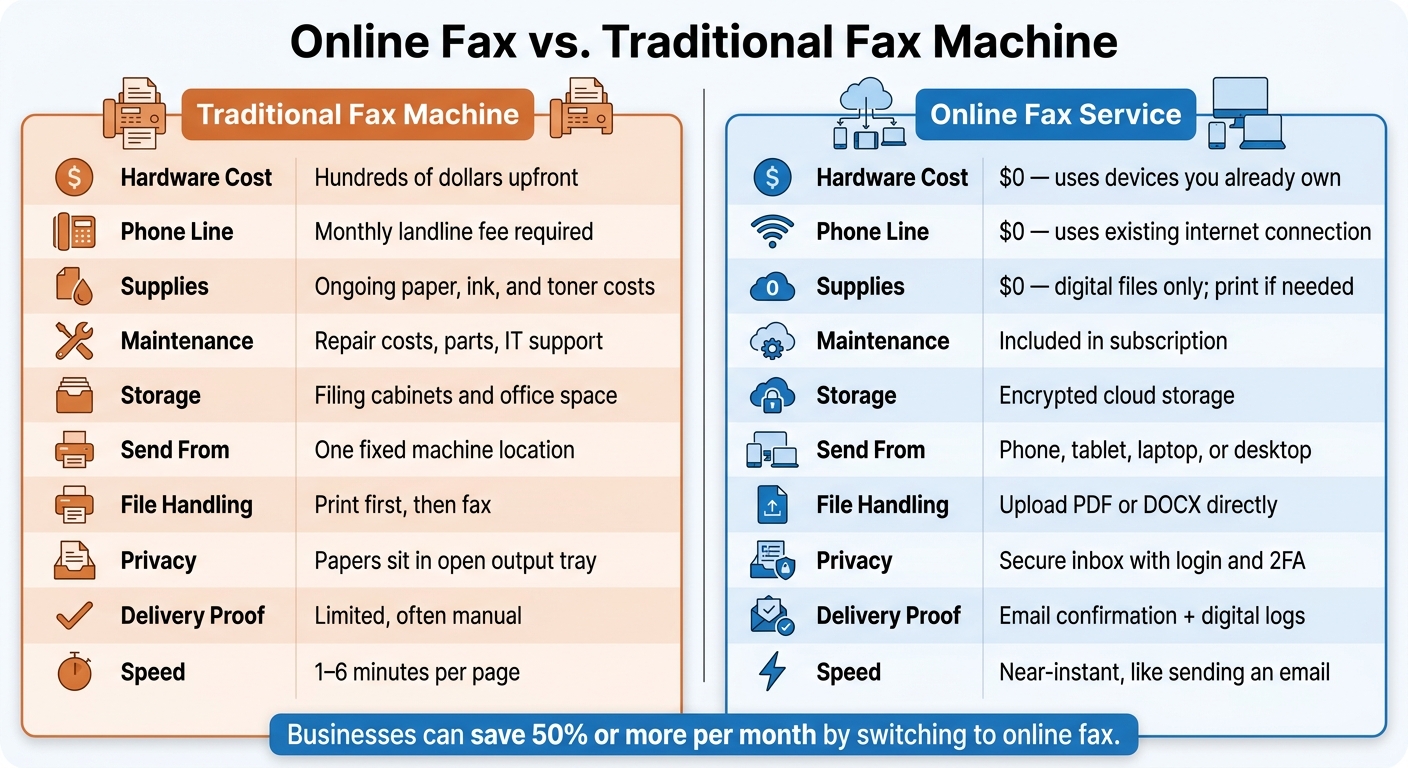
Online Fax vs. Fax Machine: Full Cost & Feature Comparison
Cost is the easiest difference to measure, and the gap goes well beyond the price of the machine itself.
The full cost of faxing includes the device, phone line, supplies, storage, and upkeep. A fax machine can cost hundreds of dollars upfront, and you still pay a monthly line fee whether you send one fax or one hundred. Those repeat costs stack up fast.
Online faxing cuts out most of that extra spend. You use the computer, phone, or tablet you already have, and the provider takes care of upkeep on the back end. In some cases, businesses can save 50% or more per month by switching from an analog fax line to an online service.
Here’s the cost gap at a glance:
| Cost Category | Traditional Fax Machine | Online Fax Service |
|---|---|---|
| Hardware | Hundreds of dollars upfront | $0 (uses devices you already own) |
| Phone Line | Monthly line fee | $0 (uses your existing internet connection) |
| Supplies | Ongoing paper, ink, and toner | $0 (digital files; print only if needed) |
| Maintenance | Repair costs, parts, and IT support | Included in subscription |
| Storage | Filing cabinets and office space | Encrypted cloud storage |
| Pricing Model | High upfront plus variable supply costs | Monthly subscription or pay-per-use |
This matters even more for teams that fax once in a while. Instead of paying for hardware that sits there doing nothing, plus a dedicated phone line, they pay only for what they use. In healthcare, legal, finance, and small business workflows, that can also mean less time spent scanning and filing and steadier monthly costs.
Conclusion
Online faxing comes out ahead in five areas: access, cost, privacy, file handling, and delivery proof. Put those together, and it’s the simpler option for day-to-day document sending.
It also does a better job of keeping sensitive documents out of sight. Instead of landing in an open paper tray where anyone nearby can see them, faxes go to a secure inbox. That matters even more when the fax also needs to work as a record.
If you work in a regulated field, keep delivery confirmations with your records.
You can often keep your existing fax number, which makes the switch easier. And for most routine business documents, online faxing gets the job done with less effort. The payoff is faxing that’s faster, cheaper, and simpler.
FAQs
Can I keep my current fax number?
Yes, you can keep your current fax number. Many cloud-based fax services let you port your existing number to their platform.
That means you can switch over without changing the number your clients, vendors, or staff already use. It’s a simple way to keep things running with little to no disruption to your day-to-day business operations.
Do online faxes work with fax machines?
Yes. Online fax services work with traditional fax machines.
When you send a document online, the service converts it into a format a fax machine can receive and print. It works the other way too: a fax sent from a standard machine can go through an online fax service and show up digitally on your computer or phone.
That means you can deal with faxes without paper or a landline.
What file types can I fax online?
You can fax common file types online, including PDF, DOC, DOCX, JPEG, JPG, PNG, and ZIP. PDF is the most accepted option and the one most services recommend for smooth, steady sending.
If your file type isn’t supported, you can usually save it or convert it to PDF first. That makes it simple to send contracts, medical records, financial reports, and images from your computer or mobile device.